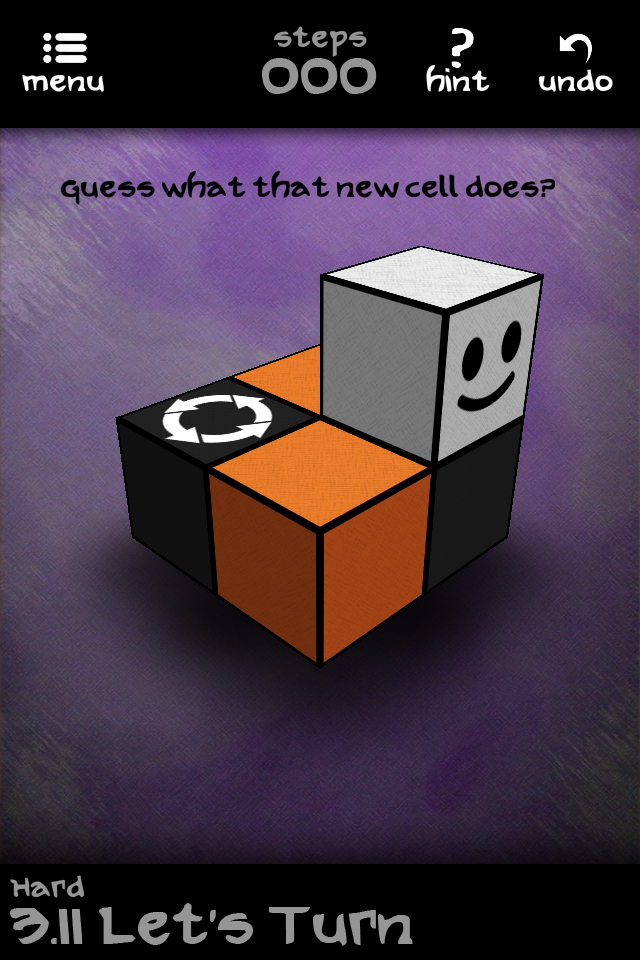
What a nice surprise! The best cube rolling puzzle game on the App Store, Qvoid, has just been updated, adding 20 new puzzles.
The new puzzles are elegantly small and challenging, as usual for this game. Here is the first one.
My first attempt? 63 steps. Second attempt? 59 steps. The creator's? 13 steps. Classic.
Showing posts with label rolling cubes. Show all posts
Monday, June 2, 2014
Wednesday, October 16, 2013
Update: Qvoid 1.7.2
The excellent Qvoid has been recently updated, adding two more free bonus packs, for a total of 40 new puzzles.
I've played some of them and they are very nice: small and challenging, just like I like them.
So if you had to remove the game from your device, this is a good time to reinstall it. And of course, if you missed it entirely, wait no more and grab it right now.
©2013 Nicola Salmoria. Unauthorized use and/or duplication without express and written permission is strictly prohibited. Excerpts and links may be used, provided that full and clear credit is given to Nicola Salmoria and nontrivialgames.blogspot.com with appropriate and specific direction to the original content.
Tuesday, May 21, 2013
Review: Qvoid for iPhone and iPad
Qvoid is a wonderfully presented puzzle game by +Raimon Zamora. The care and polish that has been put into it is unbelievable.
It was originally released in 2011, but has been updated several times and has now become free.
You control a smiling cube. The cube rolls over the playing area, beautifully animated, and when it ends over a colored tile, it picks up that color on one of its faces. Interestingly, after you've picked up a color, your moves are limited because the colored face can only touch a tile of the same color. When that happens, both colors disappear. Match all tiles, and the puzzle is solved.
You can pick up more than one color at a time, which will limit your movements even more. There's even an achievement to be earned if you can solve a puzzle picking up 6 colors at once.
Puzzles that use a rolling solid for their mechanics often tend to have large levels which take too long to solve, simply because they are large, not because they are difficult.
Qvoid doesn't make that mistake: the puzzles are small, but this doesn't make them trivial; on the contrary, the small space and the limiting game mechanics mean that you always have to use your head, especially if you try to solve them in the optimal number of moves.
If you make a mistake there's support for multiple undo, though not for redo. The undo animation is very well done, showing noise bars like a rewinding videotape (do young players of today still know what that was?).
As the puzzles progress, the game adds many additional elements to the base mechanics.
In some levels, you have to mix colors. For example, pick up yellow and blue on the same face to make it green.
An interesting addition is tiles with a number of them. Those need to be matched multiple times, and you can't pick them up while there's a number on them.
Another element which significantly influences the mechanics is bridges; those tiles that can only be passed on once, and then disappear.
Teleports introduce another major change to the gameplay. Not only they move you from one place to another, but you must step on them with a face of the same color, which complicates things even more.
Rotating tiles will turn the cube by 90 degrees every time you step on them.
Moving tiles take you across gaps (they only move when you step on them; there's no arcade action involved).
There's a total of 184 puzzles, split into 8 groups. Most groups get unlocked as you earn enough stars, except for the Bonus II group which seems to be unlockable only though an in-app purchase.
Two of the groups are called Intro I and Intro II, because they were originally included in Qvoid Intro, which is no longer available on the App Store.
Inside a group, you are encouraged to play puzzles in sequence, but if you get stuck on a puzzle there's the option to skip it and unlock the next one (for free). Or, you can use a single in-app purchase and just unlock everything.
What more can I say? This is one of the best thought out puzzle games I've ever seen. It is thoroughly enjoyable, fun both for casual playing and for deep thinking, and has a marvellous presentation. Last but not least, it has unbeatable value for money, since it's currently free. There are no excuses to not download it immediately.
©2013 Nicola Salmoria. Unauthorized use and/or duplication without express and written permission is strictly prohibited. Excerpts and links may be used, provided that full and clear credit is given to Nicola Salmoria and nontrivialgames.blogspot.com with appropriate and specific direction to the original content.
It was originally released in 2011, but has been updated several times and has now become free.
You control a smiling cube. The cube rolls over the playing area, beautifully animated, and when it ends over a colored tile, it picks up that color on one of its faces. Interestingly, after you've picked up a color, your moves are limited because the colored face can only touch a tile of the same color. When that happens, both colors disappear. Match all tiles, and the puzzle is solved.
You can pick up more than one color at a time, which will limit your movements even more. There's even an achievement to be earned if you can solve a puzzle picking up 6 colors at once.
Puzzles that use a rolling solid for their mechanics often tend to have large levels which take too long to solve, simply because they are large, not because they are difficult.
Qvoid doesn't make that mistake: the puzzles are small, but this doesn't make them trivial; on the contrary, the small space and the limiting game mechanics mean that you always have to use your head, especially if you try to solve them in the optimal number of moves.
If you make a mistake there's support for multiple undo, though not for redo. The undo animation is very well done, showing noise bars like a rewinding videotape (do young players of today still know what that was?).
As the puzzles progress, the game adds many additional elements to the base mechanics.
In some levels, you have to mix colors. For example, pick up yellow and blue on the same face to make it green.
An interesting addition is tiles with a number of them. Those need to be matched multiple times, and you can't pick them up while there's a number on them.
Another element which significantly influences the mechanics is bridges; those tiles that can only be passed on once, and then disappear.
Teleports introduce another major change to the gameplay. Not only they move you from one place to another, but you must step on them with a face of the same color, which complicates things even more.
Rotating tiles will turn the cube by 90 degrees every time you step on them.
Moving tiles take you across gaps (they only move when you step on them; there's no arcade action involved).
There's a total of 184 puzzles, split into 8 groups. Most groups get unlocked as you earn enough stars, except for the Bonus II group which seems to be unlockable only though an in-app purchase.
Two of the groups are called Intro I and Intro II, because they were originally included in Qvoid Intro, which is no longer available on the App Store.
Inside a group, you are encouraged to play puzzles in sequence, but if you get stuck on a puzzle there's the option to skip it and unlock the next one (for free). Or, you can use a single in-app purchase and just unlock everything.
What more can I say? This is one of the best thought out puzzle games I've ever seen. It is thoroughly enjoyable, fun both for casual playing and for deep thinking, and has a marvellous presentation. Last but not least, it has unbeatable value for money, since it's currently free. There are no excuses to not download it immediately.
Summary
| Nontrivialness | ★★★★☆ |
| Logical Reasoning | ★★★★☆ |
| User Interface | ★★★★☆ |
| Presentation | ★★★★★ |
| Loading Time | ★★★★★ |
| Saves Partial Progress | ✘ |
| Status Bar | ✘ |
©2013 Nicola Salmoria. Unauthorized use and/or duplication without express and written permission is strictly prohibited. Excerpts and links may be used, provided that full and clear credit is given to Nicola Salmoria and nontrivialgames.blogspot.com with appropriate and specific direction to the original content.
Sunday, February 17, 2013
Review: MatCube for iPhone and iPad
Some incredible things can happen on the App Store.
The other day I downloaded MatCube, a free game for iPhone and iPad by Eizo Ono. Nothing on the iTunes page suggested that it could be a great puzzle: I couldn't even understand the description, because it's only in Japanese, and the screenshots made it look more like a proof of concept than a full featured game.
Still, I'm glad I downloaded it, because I was blown away by how clever it is.
Actually, it's not even one puzzle. It's 4, or 8, or 24, depending on how you want to count them. Let me explain.
This is the initial screen after launching the app:
The grid of 3x3 cubes is the goal position. This is the easiest difficulty setting, where each cube has only 2 colors: 2 opposing faces are red, the others are green.
When you tap the Shuffle button, the cubes are randomly scrambled, and you need to get back to the goal position.
The first thing that I thought when I started interacting, was "this is Lights Out on steroids". Lights Out is played on a 2D grid, and MatCube appears to be the natural extension to 3D: when you tap a cube, the cubes that surround it are rotated.
Lights Out is a relatively simple puzzle, because each cell can only have 2 states: ON and OFF. MatCube is a bit more complicated because, at the easy difficulty, each cube can be in 3 states. Also, the side from which you move a cube changes its state in a different way, because the cube rotates around a different axis.
Solving MatCube at this difficulty (and by "solving" I mean finding an algorithm that consistently allows you to get back to the goal position after shuffling) isn't extremely hard, but it isn't a walk in the park either. It took me several attempts to eventually "get it", though the naive method I used doesn't generalize well to the higher difficulties.
When playing at the normal difficulty setting, each face of the cubes has a different color, so each cube can be in 6*4 = 24 different states. This makes things a lot more... interesting.
When playing in full color mode, it's useful to know that you can rotate the cubes in the opposite direction by tapping while touching the screen with another finger.
The number of cubes can also be increased, with a choice between 3x3, 4x4 and 5x5. At 5x5, it looks quite daunting:
But that's not all: what I described so far is just one of the play modes available. There are a total of four different modes.
The second one is similar to the first, but when you tap a cube you rotate all the cubes in the same row and column, instead of rotating only the surrounding ones.
The third one is a surprise: one cube is removed from the grid, and moves are made by rolling cubes towards the hole. Therefore, this could be described as "15 puzzle on steroids". I have tracked down a mechanical puzzle using the same mechanics: Rolling Cubes by John Harris.
The last mode is another surprise: the cubes are no longer laid out in a square grid, and form a pattern reminiscent of the Q*bert videogame:
Tapping a cube rotates all the surrounding ones, which can be up to 6, each one around a different axis.
So that's why at the beginning of the review I said there are 24 different puzzles in this app:
(2 colourings of the cubes) * (3 sizes of the grid) * (4 play modes) = 24 combinations.
Not bad for a free app!
Here's a video by the app developer, showing the Android version:
The main criticism I have about this wonderful puzzle is that playing on an iPhone or iPod the cubes are a bit too small, and it's difficult to tap the one you are aiming at. While this is pretty much unavoidable when playing the 5x5 version, the 3x3 and 4x4 versions could be easily improved by simply making the cubes larger.
A significant missing feature is that the position is not saved when the app goes to the background, which makes it impractical to attempt solving the larger puzzles unless one has a good amount of time to spare.
I also don't like that the only form of score is the timer shown at the top left of the screen. Personally, I would be more interested in the number of moves.
The final criticism is about the color scheme. Here is a simulation of how a person with protanopia would see the goal position in easy mode:
That could be improved by using different colors, or by adding other visual cues to the cube faces (for example, making them look like dice).
Overall, this is certainly a puzzle that will stay on my iPod for some time. Congratulations to its inventor!
©2013 Nicola Salmoria. Unauthorized use and/or duplication without express and written permission is strictly prohibited. Excerpts and links may be used, provided that full and clear credit is given to Nicola Salmoria and nontrivialgames.blogspot.com with appropriate and specific direction to the original content.
The other day I downloaded MatCube, a free game for iPhone and iPad by Eizo Ono. Nothing on the iTunes page suggested that it could be a great puzzle: I couldn't even understand the description, because it's only in Japanese, and the screenshots made it look more like a proof of concept than a full featured game.
Still, I'm glad I downloaded it, because I was blown away by how clever it is.
Actually, it's not even one puzzle. It's 4, or 8, or 24, depending on how you want to count them. Let me explain.
This is the initial screen after launching the app:
The grid of 3x3 cubes is the goal position. This is the easiest difficulty setting, where each cube has only 2 colors: 2 opposing faces are red, the others are green.
When you tap the Shuffle button, the cubes are randomly scrambled, and you need to get back to the goal position.
The first thing that I thought when I started interacting, was "this is Lights Out on steroids". Lights Out is played on a 2D grid, and MatCube appears to be the natural extension to 3D: when you tap a cube, the cubes that surround it are rotated.
Lights Out is a relatively simple puzzle, because each cell can only have 2 states: ON and OFF. MatCube is a bit more complicated because, at the easy difficulty, each cube can be in 3 states. Also, the side from which you move a cube changes its state in a different way, because the cube rotates around a different axis.
Solving MatCube at this difficulty (and by "solving" I mean finding an algorithm that consistently allows you to get back to the goal position after shuffling) isn't extremely hard, but it isn't a walk in the park either. It took me several attempts to eventually "get it", though the naive method I used doesn't generalize well to the higher difficulties.
When playing at the normal difficulty setting, each face of the cubes has a different color, so each cube can be in 6*4 = 24 different states. This makes things a lot more... interesting.
When playing in full color mode, it's useful to know that you can rotate the cubes in the opposite direction by tapping while touching the screen with another finger.
The number of cubes can also be increased, with a choice between 3x3, 4x4 and 5x5. At 5x5, it looks quite daunting:
But that's not all: what I described so far is just one of the play modes available. There are a total of four different modes.
The second one is similar to the first, but when you tap a cube you rotate all the cubes in the same row and column, instead of rotating only the surrounding ones.
The third one is a surprise: one cube is removed from the grid, and moves are made by rolling cubes towards the hole. Therefore, this could be described as "15 puzzle on steroids". I have tracked down a mechanical puzzle using the same mechanics: Rolling Cubes by John Harris.
The last mode is another surprise: the cubes are no longer laid out in a square grid, and form a pattern reminiscent of the Q*bert videogame:
Tapping a cube rotates all the surrounding ones, which can be up to 6, each one around a different axis.
So that's why at the beginning of the review I said there are 24 different puzzles in this app:
(2 colourings of the cubes) * (3 sizes of the grid) * (4 play modes) = 24 combinations.
Not bad for a free app!
Here's a video by the app developer, showing the Android version:
The main criticism I have about this wonderful puzzle is that playing on an iPhone or iPod the cubes are a bit too small, and it's difficult to tap the one you are aiming at. While this is pretty much unavoidable when playing the 5x5 version, the 3x3 and 4x4 versions could be easily improved by simply making the cubes larger.
A significant missing feature is that the position is not saved when the app goes to the background, which makes it impractical to attempt solving the larger puzzles unless one has a good amount of time to spare.
I also don't like that the only form of score is the timer shown at the top left of the screen. Personally, I would be more interested in the number of moves.
The final criticism is about the color scheme. Here is a simulation of how a person with protanopia would see the goal position in easy mode:
That could be improved by using different colors, or by adding other visual cues to the cube faces (for example, making them look like dice).
Overall, this is certainly a puzzle that will stay on my iPod for some time. Congratulations to its inventor!
Summary
| Nontrivialness | ★★★★★ |
| Logical Reasoning | ★★★★★ |
| User Interface | ★★☆☆☆ |
| Presentation | ★★☆☆☆ |
| Loading Time | ★★★★★ |
| Saves Partial Progress | ✘ |
| Status Bar | ✔ |
©2013 Nicola Salmoria. Unauthorized use and/or duplication without express and written permission is strictly prohibited. Excerpts and links may be used, provided that full and clear credit is given to Nicola Salmoria and nontrivialgames.blogspot.com with appropriate and specific direction to the original content.
Subscribe to:
Posts (Atom)