

The best iPhone and iPad games for logic puzzles enthusiasts
Showing posts with label path. Show all posts
Showing posts with label path. Show all posts
Tuesday, October 7, 2014
Review: RGB Express for iPhone and iPad
RGB Express is captivating from the beginning. It has cute graphics and animations, an everyday theme that can be related with, and it just feels light and joyful.
The Finnish-German developer Bad Crane
has clearly been targeting the young and casual audience with this game, and I think they've been quite successful. The mechanics are deeper than a simple casual game would require, but expert puzzlers will need a lot of perseverance before getting
to the interesting parts.

Saturday, September 20, 2014
Review: TAPES for iPhone and iPad
I like discovering good puzzle games that might be overlooked by most people. TAPES by Yohei Sato, a brilliant game with a user interface mostly in Japanese, is certainly one of them.
People that follow me on Twitter knew it first; now let's talk about this little gem in more detail.
 It's no mystery that I like path finding puzzles. BlockPath, for example, made into my list of the 10 best puzzle games of 2013. I have been even developing one of my own in the past months—though that project is currently on hold.
I thought I had seen everything about this concept. I was amazed, then, to be totally surprised by the rules of TAPES.
People that follow me on Twitter knew it first; now let's talk about this little gem in more detail.
I thought I had seen everything about this concept. I was amazed, then, to be totally surprised by the rules of TAPES.
Tuesday, September 2, 2014
Review: Watercolors for iPhone and iPad
I'm glad to host another review by Roberto Canogar. Hopefully more will follow!
Watercolors, developed by ADONIS SOFTWARE from Romania, is a Free game that was released a couple of months ago. It reached the #1 position in the Education category in 77 countries, and in the Puzzle category in 13 countries (including big countries like USA, UK and Canada to name a few).
At the moment the number of players in Game Center is close to one million. So, we can say it has been a successful game. But, is it a good puzzle game? What are the reasons behind its success? Lets try to answer these questions.

Watercolors, developed by ADONIS SOFTWARE from Romania, is a Free game that was released a couple of months ago. It reached the #1 position in the Education category in 77 countries, and in the Puzzle category in 13 countries (including big countries like USA, UK and Canada to name a few).
At the moment the number of players in Game Center is close to one million. So, we can say it has been a successful game. But, is it a good puzzle game? What are the reasons behind its success? Lets try to answer these questions.
Sunday, July 20, 2014
Review: Stroke! for iPhone and iPad
It's become very difficult to browse through the daily new releases on the App Store: there are just too many apps released every day. For me, the reward is discovering, every once in a while, an indie game made with very limited resources but a good idea behind. Stroke! is one of those.
 Developed by the Japanese Ryo Takanezawa, a puzzle lover who has many other puzzle apps under his belt, is one of those games that Tom Cutrofello calls "topology puzzles", and which I'd like to call "weakly constrained mazes". By that I mean that the goal of the game is to find a way through a maze where your movements are not limited by walls, but by other, less strict, rules.
Tuesday, June 10, 2014
Perfect Paths: Score 900 in Andromeda
A few people asked me: how can you score 900 in the Andromeda levels of Perfect Paths?
They are simple puzzles, with an apparently obvious solutions; there
doesn't seem to be much freedom in order to gain extra points. But on
closer inspection, you can.
If you follow me on Twitter, you should have seen a retweet about a blog which shows solutions for (almost) all the levels in the game. Of course you'll not want to spoil the game by peeking at solutions, but if you're seriously stuck, this will get you going. Even if you do copy a solution, there's still a lot of fun to be had by making it better and shorter to earn extra points.
I already gave a few tips in my review of the game, but let's look at those again with specific examples.

If you follow me on Twitter, you should have seen a retweet about a blog which shows solutions for (almost) all the levels in the game. Of course you'll not want to spoil the game by peeking at solutions, but if you're seriously stuck, this will get you going. Even if you do copy a solution, there's still a lot of fun to be had by making it better and shorter to earn extra points.
I already gave a few tips in my review of the game, but let's look at those again with specific examples.
Thursday, May 29, 2014
Review: Perfect Paths for iPhone and iPad
Hyperbolic Magnetism, in the person of Jan Split Ilavsky, surely knows how to make puzzle games that stand out from the crowd. Perfect Paths is his best so far.
 Perfect Paths is based on the previous Trappped, an iPad-only game which I think was let down by the layout of the user interface. While they share the basic mechanics, everything else has been improved so much that it can be considered a wholly new game.
Sunday, May 4, 2014
Review: Bicolor for iPhone and iPad
Bicolor is the latest creation of 1Button, a team specializing in puzzle games with a minimalist interface. It marks a significant evolution from the style of their previous games: SEQ, ON/OFF, and PILE.
 Continuing in their effort to "create applications not polluted by useless distractions", they have stripped away even color, leaving only the core puzzle elements at the center of the scene.
Tuesday, February 11, 2014
Review: Sushi Snake for iPhone and iPad
Sushi Snake by Benjamin Davis is a very original path finding game, featuring complex mechanics, small but challenging puzzles, and retro graphics that make my eyes hurt.
 You control a snake, or more precisely a "sushi" snake. Don't ask, it's a long story.
Tuesday, January 14, 2014
Nontrivial Games on Paper
The Italian magazine Amico Logico, which should be out today, contains a page of puzzles that I designed.

Tuesday, January 7, 2014
Review: LYNE for iPhone and iPad
As often happens for good puzzle games, one of my first thoughts while playing Lyne by Thomas Bowker was: why hadn't anybody thought of this before?
 More precisely, since I've been thinking about path puzzles for several weeks now, my thought was why hadn't I thought of this?
Thursday, December 19, 2013
On the uniqueness of solutions
An exchange of comments in the Willa's Walk review prompted me to talk more in depth about solution uniqueness in logic puzzles, and its possible use as a shortcut while solving the puzzles.
First of all, one question which I'm often asked is: why should logic puzzles have a unique solution?
The easy answer is: why not? When you solve a crosswords puzzle, you take it for granted that there is only one valid solution. So why should logic puzzles be any different?
The more articulated answer is: because logic puzzles are puzzles that should be solvable by logic, and logic alone; no guessing should be necessary.
Solving a logic puzzle should consist of a series of logic deductions which allow you to exclude possibilities, until you are left with only one option. If the puzzle didn't have a unique solution, you would inevitably get to a point where you have two equally valid options, and you cannot choose between them, because they both lead to a different solution.
Once it is determined that a puzzle has a single solution, a question comes to mind: can one use this knowledge to make deductions and find the solution more easily?
First of all, one question which I'm often asked is: why should logic puzzles have a unique solution?
The easy answer is: why not? When you solve a crosswords puzzle, you take it for granted that there is only one valid solution. So why should logic puzzles be any different?
The more articulated answer is: because logic puzzles are puzzles that should be solvable by logic, and logic alone; no guessing should be necessary.
Solving a logic puzzle should consist of a series of logic deductions which allow you to exclude possibilities, until you are left with only one option. If the puzzle didn't have a unique solution, you would inevitably get to a point where you have two equally valid options, and you cannot choose between them, because they both lead to a different solution.
Once it is determined that a puzzle has a single solution, a question comes to mind: can one use this knowledge to make deductions and find the solution more easily?
Saturday, December 7, 2013
Review: Tricky Circles for iPhone and iPad
In a normal day, there can easily be a hundred new apps released in the Puzzles category. It's impossible to even check the description of them all, but I try to be as thorough as possible because often the best games come out of nowhere.
Tricky Circles by Dmitry Chalovskiy is one of such games.
 After seeing the icon, I feared that it was just another clone of the boring Dots, but thankfully it's something completely different.
Tricky Circles by Dmitry Chalovskiy is one of such games.

Friday, November 22, 2013
Review: Strand for iPhone and iPad
I was surprised to see Strand mentioned in yesterday's "What's out today" article on TouchArcade, for a couple fo reasons. First, because it is not the kind of game you often see covered by TouchArcade. Second, because it was actually released three weeks ago, and I had it in my list of games to review since then.
 In a market flooded by clones of Flow (something that I will have to talk about sooner or later), Strand is a refreshingly new take on the "connect the dots" genre.

Sunday, October 20, 2013
Review: Disctrail for iPhone and iPad
Disctrail by the Swedish Knappra AB is an interactive version of a lesser-known traditional Japanese puzzle called Goishi Hiroi or Hiroimono.
Compared to most of the puzzle games available on the App Store, Goishi Hiroi is fiercely unintuitive, and it had me stumped initially. It took a lot of practice to make it finally click and be able to solve the puzzle without feeling I was moving at random.
 The basic rule of the puzzle is: find a continuous path that connects all the discs. At every step, you can move to the closest available disc in one of the four main directions, but you can't go back in the direction where you came from.
Compared to most of the puzzle games available on the App Store, Goishi Hiroi is fiercely unintuitive, and it had me stumped initially. It took a lot of practice to make it finally click and be able to solve the puzzle without feeling I was moving at random.

Tuesday, August 20, 2013
Review: BlockPath for iPhone and iPad
BlockPath Pro (also free) is a fascinatingly minimalistic path finding puzzle which hooked me from the beginning.
 It was created by Tehnio, a Latvian developer, which is an interesting thing in itself since Latvia is one of the smallest countries in Europe, with a population smaller than Houston, Texas.

Tuesday, May 7, 2013
Review: Conceptis Slitherlink for iPhone and iPad
Conceptis Slitherlink is the latest in a series of puzzle apps for iPhone and iPad developed by Conceptis, a company which specialises in classic style, pen-and-paper logic puzzles.
 I've written in the past that Slitherlink is one of my favorite puzzles, so I've played many implementations of it. Some versions are good, most notably the one in Simon Tatham's Portable Puzzle Collection which features many interesting variants.
All the ones I tried so far, however, lacked a feature which I consider critical in the transition from pen and paper to touch screen. I'm happy to say that Conceptis' version has that feature. It is actually disabled by default, but after enabling it in the options screen, here is what you see when you start a puzzle:
 See? The edges around the 0 have been automatically crossed out. The game will automatically cross out all edges that cannot contain the path according to the game rules. At long last! Isn't this what computers are supposed to be useful for? Taking care of boring, mechanical tasks and letting us focus on creative thinking. This makes solving the puzzles a lot quicker and enjoyable.
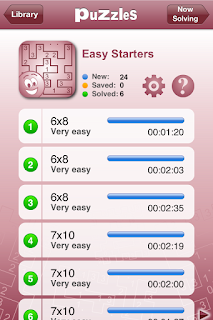 The game comes with three packs available for free from the start, plus additional packs purchasable through (not necessarily cheap) in-app purchases.
Progress and best times are diligently saved for all puzzles.
The iPad allows playing some exclusive, larger grids. iPhone still has some decently large grids:
 They are a bit difficult to play at this size, but thankfully they can be zoomed in using the pinch gesture. In zoomed mode the resolution is poor and you can see the pixels in the image, but playing is a lot easier.
 Zooming works well with Slitherlink because much of the solving process is local, and you don't need to see the whole grid at all times.
Another distinctive feature of Conceptis Slitherlink is a very comprehensive guide on solving techniques, which covers some pretty advanced topics and is worth a read.
 It's nice to see that this classic Nikoli puzzle has finally been done the way it should. Everyone that likes Slitherlink should definitely get this app, and make sure to turn the Auto complete option on.
©2013 Nicola Salmoria. Unauthorized use and/or duplication without express and written permission is strictly prohibited. Excerpts and links may be used, provided that full and clear credit is given to Nicola Salmoria and nontrivialgames.blogspot.com with appropriate and specific direction to the original content.

All the ones I tried so far, however, lacked a feature which I consider critical in the transition from pen and paper to touch screen. I'm happy to say that Conceptis' version has that feature. It is actually disabled by default, but after enabling it in the options screen, here is what you see when you start a puzzle:

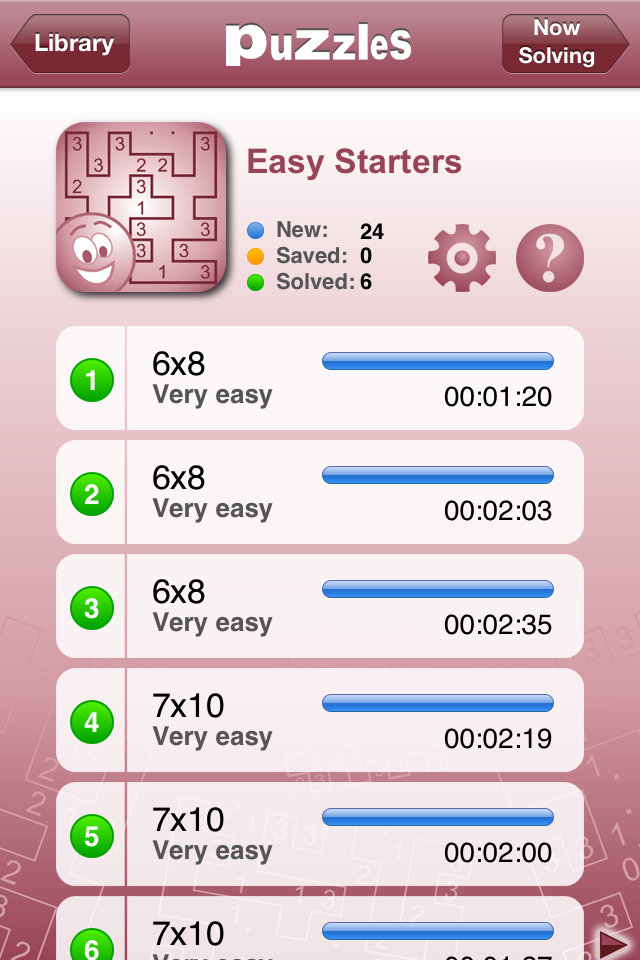
Progress and best times are diligently saved for all puzzles.
The iPad allows playing some exclusive, larger grids. iPhone still has some decently large grids:


Another distinctive feature of Conceptis Slitherlink is a very comprehensive guide on solving techniques, which covers some pretty advanced topics and is worth a read.

Summary
| Nontrivialness | ★★★☆☆ |
| Logical Reasoning | ★★★★★ |
| User Interface | ★★★★☆ |
| Presentation | ★★★☆☆ |
| Loading Time | ★★★★★ |
| Saves Partial Progress | ✔ |
| Status Bar | ✘ |
©2013 Nicola Salmoria. Unauthorized use and/or duplication without express and written permission is strictly prohibited. Excerpts and links may be used, provided that full and clear credit is given to Nicola Salmoria and nontrivialgames.blogspot.com with appropriate and specific direction to the original content.
Saturday, March 23, 2013
Review: Linesweeper for iPhone and iPad
Stanley Lam has published several puzzle games for iPhone and iPad. They all seem to share a user interface style which I don't really like, though the underlying logic puzzles can be interesting.
Linesweeper might be the best of the bunch so far. It is similar to the popular Slitherlink, but different enough to be noteworthy.
 The puzzle was actually invented a few years ago by +Jak Marshall, as mentioned on his blog.
I like closed loop puzzles, my favorite being Monorail, so it should be no surprise that I like Linesweeper too.
The play area is a grid containing some numbers. The grid is always square in this implementation of the puzzle, though it doesn't have to be.
 The goal is to draw a closed loop on the board. The loop cannot pass through cells containing a number. The numbers indicate how many of the 8 neighbouring cells must be crossed by the loop. So the solution to the above puzzle would be:
 Note that I had put a X between the 4 and 2, to remind that the loop cannot pass through that cell. The game allows to put both a X and a ? in any cell, simply by tapping it. The ? is supposed to indicate that the loop passes through the cell, but you don't yet know in which direction. To draw a segment of the loop, you simply swipe through a cell border. This works well and the game is intuitive to play, but I would have preferred if it used a dot instead of the ?, like tha Java version on janko.at does. Try #1 over there—I love the simplicity of that puzzle.
If you get stuck in a puzzle, you can quit and resume it later from where you left. Thumbs up for this too often omitted featured.
There are 50 free levels, with grid sizes from 6x6 to 10x10. Here is how a 10x10 looks like.
 There are also ads. You can use a single in-app purchase to unlock 450 extra puzzles and remove ads.
I found the difficulty rating to be a bit hit and miss. For example here is how long it took me to solve the free 6x6 puzzles:
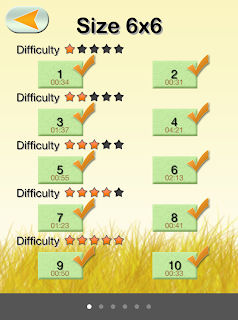 as you can see the difficulty rating didn't have much effect in my solving time, and actually one of the supposedly easiest puzzles is the one that took longest. On larger grids the effect of difficulty might be more noticeable, however my gut feeling is that the puzzles have been randomly generated and rated using some metric that makes sense for a computer solver, but doesn't directly relate to how humans solve the puzzle.
This is a fun logic puzzle, highly recommended for its mechanics, but I wish it had a more polished presentation and better difficulty classification.
©2013 Nicola Salmoria. Unauthorized use and/or duplication without express and written permission is strictly prohibited. Excerpts and links may be used, provided that full and clear credit is given to Nicola Salmoria and nontrivialgames.blogspot.com with appropriate and specific direction to the original content.
Linesweeper might be the best of the bunch so far. It is similar to the popular Slitherlink, but different enough to be noteworthy.

I like closed loop puzzles, my favorite being Monorail, so it should be no surprise that I like Linesweeper too.
The play area is a grid containing some numbers. The grid is always square in this implementation of the puzzle, though it doesn't have to be.


If you get stuck in a puzzle, you can quit and resume it later from where you left. Thumbs up for this too often omitted featured.
There are 50 free levels, with grid sizes from 6x6 to 10x10. Here is how a 10x10 looks like.

I found the difficulty rating to be a bit hit and miss. For example here is how long it took me to solve the free 6x6 puzzles:

This is a fun logic puzzle, highly recommended for its mechanics, but I wish it had a more polished presentation and better difficulty classification.
Summary
| Nontrivialness | ★★★★☆ |
| Logical Reasoning | ★★★★☆ |
| User Interface | ★★★☆☆ |
| Presentation | ★☆☆☆☆ |
| Loading Time | ★★★★★ |
| Saves Partial Progress | ✔ |
| Status Bar | ✘ |
©2013 Nicola Salmoria. Unauthorized use and/or duplication without express and written permission is strictly prohibited. Excerpts and links may be used, provided that full and clear credit is given to Nicola Salmoria and nontrivialgames.blogspot.com with appropriate and specific direction to the original content.
Tuesday, February 26, 2013
Review: Monorail for iPhone and iPad
Glenn Iba recently wrote me about his puzzle game Monorail for iPhone and iPad.
There was no need to: that game was already installed on my iPod and it's one of the most interesting puzzles I know.
 The goal of the game is deceptively simple. You start with a grid of points, with some pre-drawn lines connecting a few dots:
 Starting from there, you have to draw a closed loop that touches all points and doesn't intersect itself, like this:
 All the grids provided have a unique solution, which is somewhat surprising initially: the pre-drawn lines are such subtle clues that they almost don't seem to be there.
These puzzles are also known as "Round Trip", and have been published in magazines since the early 1990's. Glenn Iba has collected some of them in a book; an extended introduction is available on his web site. It is an interesting read and shows how to approach the puzzles with logical reasoning without trial and error.
The puzzles are similar to Slitherlink, the differences being that in Slitherlink the path doesn't have to touch every point, and the clues are numbers instead of lines. Due to the lack of numbers, I consider Round Trip a "purer", more elegant puzzle.
In addition to the traditional square grid arrangement, Monorail also contains puzzles laid out on a hexagonal grid, like this:

The game contains 50 free grids. If you want to play more, there are a few packs available through in-app purchases, for a total of over 800 grids.
The user interface is quick and easy to use, and it makes the game enjoyable. The only criticism I have is the same one that I made for CounterBalancE: there is no way to put a cross on the grid, as a reminder that a line cannot be in that position. This is odd since the use of crosses is explained in the book introduction I mentioned above, so the author clearly knows that they are useful. Annoyingly, the feature was actually available in an earlier version of the game, but was removed when the undo/redo functionality was added. It would be great if it could be reintroduced in a future update.
©2013 Nicola Salmoria. Unauthorized use and/or duplication without express and written permission is strictly prohibited. Excerpts and links may be used, provided that full and clear credit is given to Nicola Salmoria and nontrivialgames.blogspot.com with appropriate and specific direction to the original content.
There was no need to: that game was already installed on my iPod and it's one of the most interesting puzzles I know.
These puzzles are also known as "Round Trip", and have been published in magazines since the early 1990's. Glenn Iba has collected some of them in a book; an extended introduction is available on his web site. It is an interesting read and shows how to approach the puzzles with logical reasoning without trial and error.
The puzzles are similar to Slitherlink, the differences being that in Slitherlink the path doesn't have to touch every point, and the clues are numbers instead of lines. Due to the lack of numbers, I consider Round Trip a "purer", more elegant puzzle.
In addition to the traditional square grid arrangement, Monorail also contains puzzles laid out on a hexagonal grid, like this:
The game contains 50 free grids. If you want to play more, there are a few packs available through in-app purchases, for a total of over 800 grids.
The user interface is quick and easy to use, and it makes the game enjoyable. The only criticism I have is the same one that I made for CounterBalancE: there is no way to put a cross on the grid, as a reminder that a line cannot be in that position. This is odd since the use of crosses is explained in the book introduction I mentioned above, so the author clearly knows that they are useful. Annoyingly, the feature was actually available in an earlier version of the game, but was removed when the undo/redo functionality was added. It would be great if it could be reintroduced in a future update.
Summary
| Nontrivialness | ★★★★☆ |
| Logical Reasoning | ★★★★☆ |
| User Interface | ★★★☆☆ |
| Presentation | ★★★☆☆ |
| Loading Time | ★★★★★ |
| Saves Partial Progress | ✘ |
| Status Bar | ✘ |
©2013 Nicola Salmoria. Unauthorized use and/or duplication without express and written permission is strictly prohibited. Excerpts and links may be used, provided that full and clear credit is given to Nicola Salmoria and nontrivialgames.blogspot.com with appropriate and specific direction to the original content.
Subscribe to:
Posts (Atom)