

The best iPhone and iPad games for logic puzzles enthusiasts
Showing posts with label pen-and-paper. Show all posts
Showing posts with label pen-and-paper. Show all posts
Sunday, October 19, 2014
Review: Pokergreen Puzzles for iPhone and iPad
Pokergreens is not quite "the next Sudoku", as its author Ronald Stewart calls it, but it successfully manages to mix the mechanics of classic pen-and-paper puzzles with the rules of poker.
This is the kind of puzzle game that was common in the early days of the App Store: a simple, lackluster user interface, but very clever mechanics. It reminded me of games like CounterbalancE and Combination, which I reviewed when I started this blog.

Tuesday, January 14, 2014
Nontrivial Games on Paper
The Italian magazine Amico Logico, which should be out today, contains a page of puzzles that I designed.

Tuesday, January 7, 2014
Review: LYNE for iPhone and iPad
As often happens for good puzzle games, one of my first thoughts while playing Lyne by Thomas Bowker was: why hadn't anybody thought of this before?
 More precisely, since I've been thinking about path puzzles for several weeks now, my thought was why hadn't I thought of this?
Thursday, December 26, 2013
Review: Sifar for iPhone and iPad
Sifar by Takahiro Sakuda is a game in the tradition of Japanese logic puzzles.
 Interestingly, it would have worked as a
pen and paper puzzle, and the rules are simple enough that I wondered if it had been published before,
but couldn't find any prior art.
Interestingly, it would have worked as a
pen and paper puzzle, and the rules are simple enough that I wondered if it had been published before,
but couldn't find any prior art.

Thursday, December 19, 2013
On the uniqueness of solutions
An exchange of comments in the Willa's Walk review prompted me to talk more in depth about solution uniqueness in logic puzzles, and its possible use as a shortcut while solving the puzzles.
First of all, one question which I'm often asked is: why should logic puzzles have a unique solution?
The easy answer is: why not? When you solve a crosswords puzzle, you take it for granted that there is only one valid solution. So why should logic puzzles be any different?
The more articulated answer is: because logic puzzles are puzzles that should be solvable by logic, and logic alone; no guessing should be necessary.
Solving a logic puzzle should consist of a series of logic deductions which allow you to exclude possibilities, until you are left with only one option. If the puzzle didn't have a unique solution, you would inevitably get to a point where you have two equally valid options, and you cannot choose between them, because they both lead to a different solution.
Once it is determined that a puzzle has a single solution, a question comes to mind: can one use this knowledge to make deductions and find the solution more easily?
First of all, one question which I'm often asked is: why should logic puzzles have a unique solution?
The easy answer is: why not? When you solve a crosswords puzzle, you take it for granted that there is only one valid solution. So why should logic puzzles be any different?
The more articulated answer is: because logic puzzles are puzzles that should be solvable by logic, and logic alone; no guessing should be necessary.
Solving a logic puzzle should consist of a series of logic deductions which allow you to exclude possibilities, until you are left with only one option. If the puzzle didn't have a unique solution, you would inevitably get to a point where you have two equally valid options, and you cannot choose between them, because they both lead to a different solution.
Once it is determined that a puzzle has a single solution, a question comes to mind: can one use this knowledge to make deductions and find the solution more easily?
Sunday, October 20, 2013
Review: Disctrail for iPhone and iPad
Disctrail by the Swedish Knappra AB is an interactive version of a lesser-known traditional Japanese puzzle called Goishi Hiroi or Hiroimono.
Compared to most of the puzzle games available on the App Store, Goishi Hiroi is fiercely unintuitive, and it had me stumped initially. It took a lot of practice to make it finally click and be able to solve the puzzle without feeling I was moving at random.
 The basic rule of the puzzle is: find a continuous path that connects all the discs. At every step, you can move to the closest available disc in one of the four main directions, but you can't go back in the direction where you came from.
Compared to most of the puzzle games available on the App Store, Goishi Hiroi is fiercely unintuitive, and it had me stumped initially. It took a lot of practice to make it finally click and be able to solve the puzzle without feeling I was moving at random.

Friday, September 6, 2013
Review: FlowDoku for iPhone and iPad
Just when you thought that Sudoku had been beaten to death, here comes FlowDoku by HapaFive Games, which turns the concept on its head to produce an excitingly original new puzzle.
 To be clear, the only thing this game shares with Sudoku is the basic premise of placing symbols on a grid so that certain requirements are met on every row, column, and box. That's pretty much the end of similarities.
In Sudoku you have 9 different symbols, which must not be repeated; in FlowDoku, you have a smaller number of symbols, some of which must be repeated a given number of times.


In Sudoku you have 9 different symbols, which must not be repeated; in FlowDoku, you have a smaller number of symbols, some of which must be repeated a given number of times.

Tuesday, August 20, 2013
Review: BlockPath for iPhone and iPad
BlockPath Pro (also free) is a fascinatingly minimalistic path finding puzzle which hooked me from the beginning.
 It was created by Tehnio, a Latvian developer, which is an interesting thing in itself since Latvia is one of the smallest countries in Europe, with a population smaller than Houston, Texas.

Monday, June 10, 2013
Update: Fields 1.0.4
Fields by Kevin Langdon has just been updated and it addressed the criticism I made in my previous review.
 In its first release the game showed a lot of potential: the flower theme fits perfectly the mechanics of the puzzles. Unfortunately, I was disappointed that some puzzles didn't have a unique solution. I'm happy to see that this issue has been fully fixed in the update.
 There are 100 new puzzles to solve, and two extra packs of 100 puzzles of size 4x5 and 5x6 that can be unlocked through in-app purchases. Hopefully more packs at larger sizes will be available in a future update.
Now that the puzzles have a unique solution, they are a joy to solve. I wish the user interface were just a bit smoother in the transitions, but apart from that the game is strongly recommended.
©2013 Nicola Salmoria. Unauthorized use and/or duplication without express and written permission is strictly prohibited. Excerpts and links may be used, provided that full and clear credit is given to Nicola Salmoria and nontrivialgames.blogspot.com with appropriate and specific direction to the original content.


Now that the puzzles have a unique solution, they are a joy to solve. I wish the user interface were just a bit smoother in the transitions, but apart from that the game is strongly recommended.
©2013 Nicola Salmoria. Unauthorized use and/or duplication without express and written permission is strictly prohibited. Excerpts and links may be used, provided that full and clear credit is given to Nicola Salmoria and nontrivialgames.blogspot.com with appropriate and specific direction to the original content.
Saturday, May 18, 2013
Review: Takuzu for iPhone and iPad
Takuzu is a fake Japanese sounding name for a puzzle that has often been described as "binary Sudoku" (even if it's quite different from Sudoku). Indeed, it is also known as Binairo, or simply as Binary Puzzle.
It is played on a square grid of variable size; the iPhone version supports from 4x4 to 8x8, while the iPad version from 6x6 to 12x12.
 The rules are:
1) Each row and column must contain the same number of 0s and 1s
2) There can be no more than two consecutive 0s or 1s.
3) There cannot be two identical rows or columns.
Rule 3) is not intuitive and is often unnecessary.
I didn't find the puzzles particularly enjoyable. The easiest ones felt like mechanical applications of the basic tips, which are trivial corollaries of the rules. In the harder ones, I got often stuck with no apparent way to proceed through logic deductions, the only way forward being to make a guess.
Of course I might have missed something, however it doesn't look like this puzzle has enough depth to provide lasting appeal.
The game generates the puzzles randomly; when you want to add a new one to the list, you select the size and difficulty (from 3 levels). Puzzles in progress are diligently stored and you can go back to them at any time.
 I don't like the random generation. In this kind of games, random generation usually doesn't provide
enjoyable puzzles; a careful selection process is needed to pick only the interesting
puzzles.
I don't like the random generation. In this kind of games, random generation usually doesn't provide
enjoyable puzzles; a careful selection process is needed to pick only the interesting
puzzles.
The first 50 puzzles are free, so give this one a try if you think the mechanics are interesting.
©2013 Nicola Salmoria. Unauthorized use and/or duplication without express and written permission is strictly prohibited. Excerpts and links may be used, provided that full and clear credit is given to Nicola Salmoria and nontrivialgames.blogspot.com with appropriate and specific direction to the original content.
It is played on a square grid of variable size; the iPhone version supports from 4x4 to 8x8, while the iPad version from 6x6 to 12x12.

1) Each row and column must contain the same number of 0s and 1s
2) There can be no more than two consecutive 0s or 1s.
3) There cannot be two identical rows or columns.
Rule 3) is not intuitive and is often unnecessary.
I didn't find the puzzles particularly enjoyable. The easiest ones felt like mechanical applications of the basic tips, which are trivial corollaries of the rules. In the harder ones, I got often stuck with no apparent way to proceed through logic deductions, the only way forward being to make a guess.
Of course I might have missed something, however it doesn't look like this puzzle has enough depth to provide lasting appeal.
The game generates the puzzles randomly; when you want to add a new one to the list, you select the size and difficulty (from 3 levels). Puzzles in progress are diligently stored and you can go back to them at any time.

The first 50 puzzles are free, so give this one a try if you think the mechanics are interesting.
Summary
| Nontrivialness | ★★★☆☆ |
| Logical Reasoning | ★★★☆☆ |
| User Interface | ★★★☆☆ |
| Presentation | ★★☆☆☆ |
| Loading Time | ★★★☆☆ |
| Saves Partial Progress | ✔ |
| Status Bar | ✔ |
©2013 Nicola Salmoria. Unauthorized use and/or duplication without express and written permission is strictly prohibited. Excerpts and links may be used, provided that full and clear credit is given to Nicola Salmoria and nontrivialgames.blogspot.com with appropriate and specific direction to the original content.
Tuesday, May 7, 2013
Review: Conceptis Slitherlink for iPhone and iPad
Conceptis Slitherlink is the latest in a series of puzzle apps for iPhone and iPad developed by Conceptis, a company which specialises in classic style, pen-and-paper logic puzzles.
 I've written in the past that Slitherlink is one of my favorite puzzles, so I've played many implementations of it. Some versions are good, most notably the one in Simon Tatham's Portable Puzzle Collection which features many interesting variants.
All the ones I tried so far, however, lacked a feature which I consider critical in the transition from pen and paper to touch screen. I'm happy to say that Conceptis' version has that feature. It is actually disabled by default, but after enabling it in the options screen, here is what you see when you start a puzzle:
 See? The edges around the 0 have been automatically crossed out. The game will automatically cross out all edges that cannot contain the path according to the game rules. At long last! Isn't this what computers are supposed to be useful for? Taking care of boring, mechanical tasks and letting us focus on creative thinking. This makes solving the puzzles a lot quicker and enjoyable.
 The game comes with three packs available for free from the start, plus additional packs purchasable through (not necessarily cheap) in-app purchases.
Progress and best times are diligently saved for all puzzles.
The iPad allows playing some exclusive, larger grids. iPhone still has some decently large grids:
 They are a bit difficult to play at this size, but thankfully they can be zoomed in using the pinch gesture. In zoomed mode the resolution is poor and you can see the pixels in the image, but playing is a lot easier.
 Zooming works well with Slitherlink because much of the solving process is local, and you don't need to see the whole grid at all times.
Another distinctive feature of Conceptis Slitherlink is a very comprehensive guide on solving techniques, which covers some pretty advanced topics and is worth a read.
 It's nice to see that this classic Nikoli puzzle has finally been done the way it should. Everyone that likes Slitherlink should definitely get this app, and make sure to turn the Auto complete option on.
©2013 Nicola Salmoria. Unauthorized use and/or duplication without express and written permission is strictly prohibited. Excerpts and links may be used, provided that full and clear credit is given to Nicola Salmoria and nontrivialgames.blogspot.com with appropriate and specific direction to the original content.

All the ones I tried so far, however, lacked a feature which I consider critical in the transition from pen and paper to touch screen. I'm happy to say that Conceptis' version has that feature. It is actually disabled by default, but after enabling it in the options screen, here is what you see when you start a puzzle:

Progress and best times are diligently saved for all puzzles.
The iPad allows playing some exclusive, larger grids. iPhone still has some decently large grids:


Another distinctive feature of Conceptis Slitherlink is a very comprehensive guide on solving techniques, which covers some pretty advanced topics and is worth a read.

Summary
| Nontrivialness | ★★★☆☆ |
| Logical Reasoning | ★★★★★ |
| User Interface | ★★★★☆ |
| Presentation | ★★★☆☆ |
| Loading Time | ★★★★★ |
| Saves Partial Progress | ✔ |
| Status Bar | ✘ |
©2013 Nicola Salmoria. Unauthorized use and/or duplication without express and written permission is strictly prohibited. Excerpts and links may be used, provided that full and clear credit is given to Nicola Salmoria and nontrivialgames.blogspot.com with appropriate and specific direction to the original content.
Sunday, April 21, 2013
Review: Fields for iPhone and iPad
Fields by Kevin Langdon is a restyling of the classic Fillomino logic puzzle, which is published by many magazines.

On paper, Fillomino is typically played by filling with lines and numbers a white grid, like this image taken from janko.at shows.

To fill an empty cell, you just drag from a populated cell nearby. The goal is to completely cover the grid with flowers, in such a way that the size of each area matches the numbers given. So in the image below, we want to have 4 sunflowers and 2 violets.

The puzzle above clearly has two solutions. I had hoped that this was just because it is part of the tutorial, but unfortunately it happens on normal puzzles as well, like this one:

This is a major letdown for a puzzle like Fillomino. These puzzles must have a single solution to be fun.
Currently, Fields contains 100 puzzles of various sizes, from 4x5 up to 8x11. 8x11 feels a bit tight on iPhone and you need to be careful where you touch, but it's still playable.

Fields makes me a bit sad. It has a good user interface, much more enjoyable than other ports of Fillomino, but some of the puzzles are sub-par due to the multiple solutions. Luckily, this shouldn't be too difficult to fix in an update.
Update 10th June 2013: the issue of multiple solutions has indeed been fixed in an update.
Summary
| Nontrivialness | ★★★☆☆ |
| Logical Reasoning | ★★★★☆ |
| User Interface | ★★★☆☆ |
| Presentation | ★★★☆☆ |
| Loading Time | ★★★★★ |
| Saves Partial Progress | ✘ |
| Status Bar | ✘ |
©2013 Nicola Salmoria. Unauthorized use and/or duplication without express and written permission is strictly prohibited. Excerpts and links may be used, provided that full and clear credit is given to Nicola Salmoria and nontrivialgames.blogspot.com with appropriate and specific direction to the original content.
Monday, April 8, 2013
Review: Simon Tatham's Portable Puzzle Collection
Often, puzzle collections aren't very good. I prefer games that are focused on doing a single thing in the best possible way.
Simon Tatham's Portable Puzzle Collection, however, is a different story. It is more than a classic: it's a piece of history. The "Portable" in the name doesn't refer to mobile devices, but rather to software portability. It was initially created in 2004, before the iPhone even existed, and initially it ran only on Unix and Windows. I used to play it 8 years ago, on a Palm Tungsten E2, using a stylus.
The portable collection consists of good logic puzzles, some well known, other less known, and it's still growing and being maintained. Currently it includes 36 different puzzles.
The collection was actually already present on the App Store, under various names, both as a whole and as single games; as far as I know, in most cases this was done without acknowledgements to Simon Tatham. At long last, Greg Hewgill has done a "legit" port of good quality.
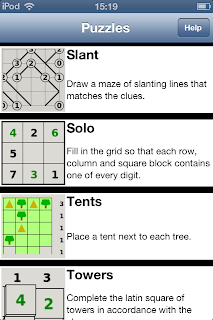 Some of the puzzle names are a bit odd, for example Sudoku is called Solo, Slitherlink is called Loopy, and so on.
 My favorite has always been Loopy. Over the years, it has evolved from standard Slitherlink, acquiring the ability to play on all kinds of non-square grids, for example Snub-Square:
 The beautiful thing about this collection is that all puzzles come with a range of predefined sizes, parameters, and difficulties, which can be quickly selected.
 If the predefined settings aren't enough, there's a Custom option where you can set everything to your liking.
This incredible flexibility can be achieved because all the puzzles are randomly generated every time you play. This is often a weakness in logic puzzles, as I am convinced that the best puzzles can only derive from careful selection and cannot be generated on the fly. Still, this is a reasonable compromise in the scope of this collection.
 There are some small criticisms to make to this first version of the port to iPhone and iPad, which will hopefully be addressed in future updates.
Several puzzles give the ability to place crosses or other marks. When played on PC, that maps to the right mouse button, while on iPhone it has become a long press.
In puzzles where you need to place several exclusions in a row, like Loopy, this gets a bit tiring and slows down the solving process. This could be mitigated by using a toggle switch in the toolbar.
On iPhone, the puzzle selection list would probably work better if it used smaller thumbnails and shorter descriptions. Seeing just 4 lines at a time is a bit too little and requires a lot of scrolling to reach the puzzle you want to play. On iPad the puzzle list is a grid so it works much better.
 Finally, on iPhone, large puzzles are a hard to play and really need support for the pinch gesture to zoom. Again, this is less of a problem on iPad.
 Good logic puzzles, lots of variety, free, no ads, no in-app purchases. It's a no-brainer to highly recommend this collection.
©2013 Nicola Salmoria. Unauthorized use and/or duplication without express and written permission is strictly prohibited. Excerpts and links may be used, provided that full and clear credit is given to Nicola Salmoria and nontrivialgames.blogspot.com with appropriate and specific direction to the original content.
Simon Tatham's Portable Puzzle Collection, however, is a different story. It is more than a classic: it's a piece of history. The "Portable" in the name doesn't refer to mobile devices, but rather to software portability. It was initially created in 2004, before the iPhone even existed, and initially it ran only on Unix and Windows. I used to play it 8 years ago, on a Palm Tungsten E2, using a stylus.
The portable collection consists of good logic puzzles, some well known, other less known, and it's still growing and being maintained. Currently it includes 36 different puzzles.
The collection was actually already present on the App Store, under various names, both as a whole and as single games; as far as I know, in most cases this was done without acknowledgements to Simon Tatham. At long last, Greg Hewgill has done a "legit" port of good quality.


This incredible flexibility can be achieved because all the puzzles are randomly generated every time you play. This is often a weakness in logic puzzles, as I am convinced that the best puzzles can only derive from careful selection and cannot be generated on the fly. Still, this is a reasonable compromise in the scope of this collection.

Several puzzles give the ability to place crosses or other marks. When played on PC, that maps to the right mouse button, while on iPhone it has become a long press.
In puzzles where you need to place several exclusions in a row, like Loopy, this gets a bit tiring and slows down the solving process. This could be mitigated by using a toggle switch in the toolbar.
On iPhone, the puzzle selection list would probably work better if it used smaller thumbnails and shorter descriptions. Seeing just 4 lines at a time is a bit too little and requires a lot of scrolling to reach the puzzle you want to play. On iPad the puzzle list is a grid so it works much better.

Summary
| Nontrivialness | ★★★★★ |
| Logical Reasoning | ★★★★★ |
| User Interface | ★★★☆☆ |
| Presentation | ★★★☆☆ |
| Loading Time | ★★★★★ |
| Saves Partial Progress | ✔ |
| Status Bar | ✔ |
©2013 Nicola Salmoria. Unauthorized use and/or duplication without express and written permission is strictly prohibited. Excerpts and links may be used, provided that full and clear credit is given to Nicola Salmoria and nontrivialgames.blogspot.com with appropriate and specific direction to the original content.
Saturday, March 23, 2013
Review: Linesweeper for iPhone and iPad
Stanley Lam has published several puzzle games for iPhone and iPad. They all seem to share a user interface style which I don't really like, though the underlying logic puzzles can be interesting.
Linesweeper might be the best of the bunch so far. It is similar to the popular Slitherlink, but different enough to be noteworthy.
 The puzzle was actually invented a few years ago by +Jak Marshall, as mentioned on his blog.
I like closed loop puzzles, my favorite being Monorail, so it should be no surprise that I like Linesweeper too.
The play area is a grid containing some numbers. The grid is always square in this implementation of the puzzle, though it doesn't have to be.
 The goal is to draw a closed loop on the board. The loop cannot pass through cells containing a number. The numbers indicate how many of the 8 neighbouring cells must be crossed by the loop. So the solution to the above puzzle would be:
 Note that I had put a X between the 4 and 2, to remind that the loop cannot pass through that cell. The game allows to put both a X and a ? in any cell, simply by tapping it. The ? is supposed to indicate that the loop passes through the cell, but you don't yet know in which direction. To draw a segment of the loop, you simply swipe through a cell border. This works well and the game is intuitive to play, but I would have preferred if it used a dot instead of the ?, like tha Java version on janko.at does. Try #1 over there—I love the simplicity of that puzzle.
If you get stuck in a puzzle, you can quit and resume it later from where you left. Thumbs up for this too often omitted featured.
There are 50 free levels, with grid sizes from 6x6 to 10x10. Here is how a 10x10 looks like.
 There are also ads. You can use a single in-app purchase to unlock 450 extra puzzles and remove ads.
I found the difficulty rating to be a bit hit and miss. For example here is how long it took me to solve the free 6x6 puzzles:
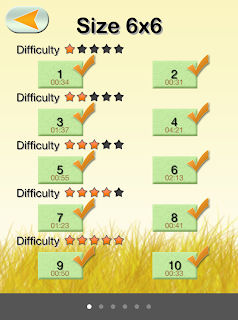 as you can see the difficulty rating didn't have much effect in my solving time, and actually one of the supposedly easiest puzzles is the one that took longest. On larger grids the effect of difficulty might be more noticeable, however my gut feeling is that the puzzles have been randomly generated and rated using some metric that makes sense for a computer solver, but doesn't directly relate to how humans solve the puzzle.
This is a fun logic puzzle, highly recommended for its mechanics, but I wish it had a more polished presentation and better difficulty classification.
©2013 Nicola Salmoria. Unauthorized use and/or duplication without express and written permission is strictly prohibited. Excerpts and links may be used, provided that full and clear credit is given to Nicola Salmoria and nontrivialgames.blogspot.com with appropriate and specific direction to the original content.
Linesweeper might be the best of the bunch so far. It is similar to the popular Slitherlink, but different enough to be noteworthy.

I like closed loop puzzles, my favorite being Monorail, so it should be no surprise that I like Linesweeper too.
The play area is a grid containing some numbers. The grid is always square in this implementation of the puzzle, though it doesn't have to be.


If you get stuck in a puzzle, you can quit and resume it later from where you left. Thumbs up for this too often omitted featured.
There are 50 free levels, with grid sizes from 6x6 to 10x10. Here is how a 10x10 looks like.

I found the difficulty rating to be a bit hit and miss. For example here is how long it took me to solve the free 6x6 puzzles:

This is a fun logic puzzle, highly recommended for its mechanics, but I wish it had a more polished presentation and better difficulty classification.
Summary
| Nontrivialness | ★★★★☆ |
| Logical Reasoning | ★★★★☆ |
| User Interface | ★★★☆☆ |
| Presentation | ★☆☆☆☆ |
| Loading Time | ★★★★★ |
| Saves Partial Progress | ✔ |
| Status Bar | ✘ |
©2013 Nicola Salmoria. Unauthorized use and/or duplication without express and written permission is strictly prohibited. Excerpts and links may be used, provided that full and clear credit is given to Nicola Salmoria and nontrivialgames.blogspot.com with appropriate and specific direction to the original content.
Tuesday, February 26, 2013
Review: Monorail for iPhone and iPad
Glenn Iba recently wrote me about his puzzle game Monorail for iPhone and iPad.
There was no need to: that game was already installed on my iPod and it's one of the most interesting puzzles I know.
 The goal of the game is deceptively simple. You start with a grid of points, with some pre-drawn lines connecting a few dots:
 Starting from there, you have to draw a closed loop that touches all points and doesn't intersect itself, like this:
 All the grids provided have a unique solution, which is somewhat surprising initially: the pre-drawn lines are such subtle clues that they almost don't seem to be there.
These puzzles are also known as "Round Trip", and have been published in magazines since the early 1990's. Glenn Iba has collected some of them in a book; an extended introduction is available on his web site. It is an interesting read and shows how to approach the puzzles with logical reasoning without trial and error.
The puzzles are similar to Slitherlink, the differences being that in Slitherlink the path doesn't have to touch every point, and the clues are numbers instead of lines. Due to the lack of numbers, I consider Round Trip a "purer", more elegant puzzle.
In addition to the traditional square grid arrangement, Monorail also contains puzzles laid out on a hexagonal grid, like this:

The game contains 50 free grids. If you want to play more, there are a few packs available through in-app purchases, for a total of over 800 grids.
The user interface is quick and easy to use, and it makes the game enjoyable. The only criticism I have is the same one that I made for CounterBalancE: there is no way to put a cross on the grid, as a reminder that a line cannot be in that position. This is odd since the use of crosses is explained in the book introduction I mentioned above, so the author clearly knows that they are useful. Annoyingly, the feature was actually available in an earlier version of the game, but was removed when the undo/redo functionality was added. It would be great if it could be reintroduced in a future update.
©2013 Nicola Salmoria. Unauthorized use and/or duplication without express and written permission is strictly prohibited. Excerpts and links may be used, provided that full and clear credit is given to Nicola Salmoria and nontrivialgames.blogspot.com with appropriate and specific direction to the original content.
There was no need to: that game was already installed on my iPod and it's one of the most interesting puzzles I know.
These puzzles are also known as "Round Trip", and have been published in magazines since the early 1990's. Glenn Iba has collected some of them in a book; an extended introduction is available on his web site. It is an interesting read and shows how to approach the puzzles with logical reasoning without trial and error.
The puzzles are similar to Slitherlink, the differences being that in Slitherlink the path doesn't have to touch every point, and the clues are numbers instead of lines. Due to the lack of numbers, I consider Round Trip a "purer", more elegant puzzle.
In addition to the traditional square grid arrangement, Monorail also contains puzzles laid out on a hexagonal grid, like this:
The game contains 50 free grids. If you want to play more, there are a few packs available through in-app purchases, for a total of over 800 grids.
The user interface is quick and easy to use, and it makes the game enjoyable. The only criticism I have is the same one that I made for CounterBalancE: there is no way to put a cross on the grid, as a reminder that a line cannot be in that position. This is odd since the use of crosses is explained in the book introduction I mentioned above, so the author clearly knows that they are useful. Annoyingly, the feature was actually available in an earlier version of the game, but was removed when the undo/redo functionality was added. It would be great if it could be reintroduced in a future update.
Summary
| Nontrivialness | ★★★★☆ |
| Logical Reasoning | ★★★★☆ |
| User Interface | ★★★☆☆ |
| Presentation | ★★★☆☆ |
| Loading Time | ★★★★★ |
| Saves Partial Progress | ✘ |
| Status Bar | ✘ |
©2013 Nicola Salmoria. Unauthorized use and/or duplication without express and written permission is strictly prohibited. Excerpts and links may be used, provided that full and clear credit is given to Nicola Salmoria and nontrivialgames.blogspot.com with appropriate and specific direction to the original content.
Wednesday, February 13, 2013
Review: CounterBalancE for iPhone and iPad
CounterBalanceE is a logic puzzle for iPhone and iPad by George Menhorn which was originally released back in 2009.
A free version called CounterBalancE Lite is also available.

The concept is pretty good and original.
You start with a grid containing some holes and some labelled nodes, like this:

The goal is for the total length of the links starting from each labelled node to be equal to the label of the node. So the solution of the above puzzle would be:

Note that the solution above is not unique, because you could put an extra node in the bottom left corner. However, that node wouldn't contribute to the solution in any way since it wouldn't develop any new link to a numbered node. This is true for every puzzle included in the game: there is always a single solution except for the occasional possibility of adding additional, isolated, nodes.
Can the puzzles be solved with logic alone, without resorting to trial and error?
I suspect they could, however the game doesn't give the player the means to do so.
As an example, here's one of the puzzles at the highest difficulty level:


That's a shame: simply adding the ability to put down a cross by tapping and holding on a cell would make the game a lot deeper and enjoyable. As it currently is, the more difficult puzzles feel more like randomly moving nodes around attempting to get closer to the solution.
Update 14/02/2013: George Menhorn kindly answered to this review, promising to add this feature in a future update. Thanks George!
Another annoyance is that the current position isn't saved when sending the app to the background, so if you don't solve a puzzle in a single session, you risk having to start from scratch the next time you run the game.
A final nitpick is that the red/green color of the nodes is the only clue (short of counting the length of all the links) of whether a node is correctly connected or not. This might make it difficult for color blind people to play the game. For example here is a simulation of how a person with protanopia would see the puzzle above; it's pretty difficult to see that one of the 4's is of a different color.

This is still a very good logic puzzle and for 99 cents I can wholeheartedly recommend it, but if the user interface were improved, it would become excellent.
Summary
| Nontrivialness | ★★★★★ |
| Logical Reasoning | ★★★☆☆ |
| User Interface | ★★☆☆☆ |
| Presentation | ★★★☆☆ |
| Loading Time | ★★★★★ |
| Saves Partial Progress | ✘ |
| Status Bar | ✔ |
©2013 Nicola Salmoria. Unauthorized use and/or duplication without express and written permission is strictly prohibited. Excerpts and links may be used, provided that full and clear credit is given to Nicola Salmoria and nontrivialgames.blogspot.com with appropriate and specific direction to the original content.
Subscribe to:
Posts (Atom)