Wednesday, March 27, 2013

Review: Tile'm all for iPhone and iPad

Tile'm all by Dimitry Bogaevsky is an incredibly hard puzzle game for iPhone and iPad.

At first, it looks like just another sliding tile puzzle,
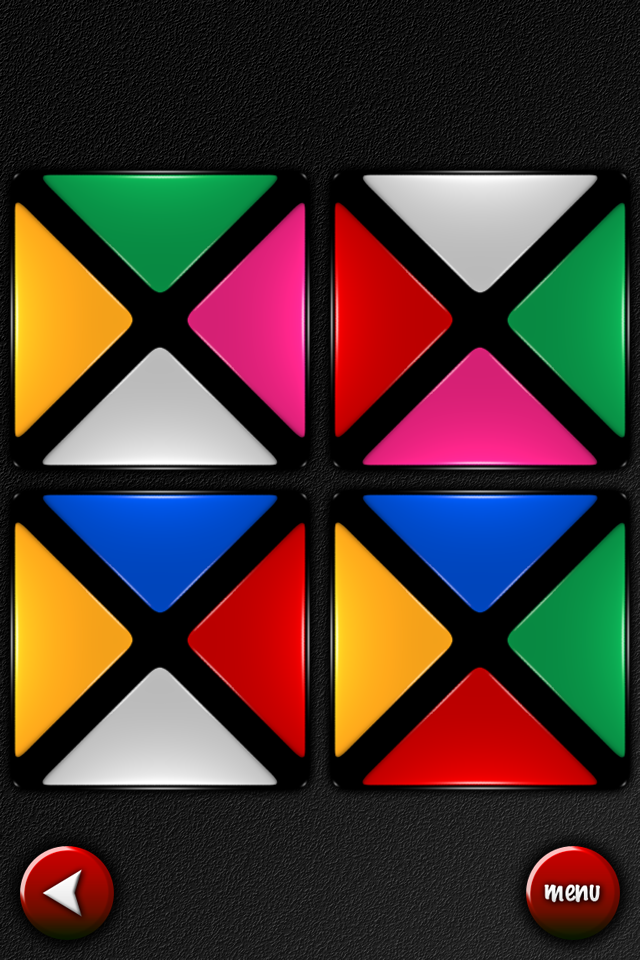
but there is a clever variation, which I had never seen before: when two neighboring tiles are the same color, they merge, and from then on they can only move as a single piece.

The goal is to merge all pieces of the same color.

So in the puzzle above, if you move the green tile left you get into this position,
which is already a lost position: continuing from here, you could for example merge the two yellow tiles and the two red tiles, but only leaving the green tiles split into two groups.

The game contains 119 levels. The first three are 3x3, all the others are 4x4.
Puzzle #4 is pretty difficult already.
These puzzle feel claustrophobic, because every time two pieces are joined your movement options are reduced. Reaching the solution requires careful planning from the very first move, otherwise you'll inevitably end up blocked.

There's support for undo, but only of the last move, so to try different strategies you always have to restart from the beginning.

If you get stuck on a puzzle—and I guarantee that you will—there's a built-in hint system that allows to see a solved position (which is not necessarily the only one). Finding the moves to get there is still up to you, but knowing where the tiles need to go is a huge help.

The hint system is locked at the beginning and can be unlocked with a single in-app purchase. Once purchased, you can use it without limits. So be careful not to spoil the fun.

The user interface in this initial release is a bit rough and sluggish, detracting somewhat from the enjoyment of the game. For example, the movement of tiles while you drag them is a bit choppy.

The most serious shortcoming, however, is the puzzle selection list: you have to scroll puzzles one by one, with no trace of inertial scrolling, and they scroll horizontally instead of vertically. It works very differently from the standard iOS controls.
I think the game would greatly benefit from using a master-detail layout like Lazors or Subaku.

The color scheme could also be improved for color blind people, here is the customary simulation of protanopia:
My final worry is that all the puzzles have a similar checkerboard pattern. This is unavoidable because of the rules: at the beginning there can't be two tiles of the same color side by side, otherwise they would be merged immediately. This might make the puzzles feel repetitive after a while.

This game is highly recommended for its novel mechanics and frustrating difficulty. I hope the user interface will be significantly improved in future updates.

Summary

Nontrivialness★★★★★
Logical Reasoning★★★★☆
User Interface★☆☆☆☆
Presentation★★★☆☆
Loading Time★★★★★
Saves Partial Progress
Status Bar

©2013 Nicola Salmoria. Unauthorized use and/or duplication without express and written permission is strictly prohibited. Excerpts and links may be used, provided that full and clear credit is given to Nicola Salmoria and nontrivialgames.blogspot.com with appropriate and specific direction to the original content.

Tuesday, March 26, 2013

Review: Subaku for iPhone and iPad

I'm usually suspicious of puzzle games that have "easy to learn and difficult to master" in their description, but Subaku by Eric Koziol is good despite that.

I'm also totally bored by sudoku, but thankfully, despite the misleading icon and the suspiciously similar name, this is a completely different puzzle.

If you are suspicious too, there's also a free version called subaku mini, which contains just the first 10 puzzles.
The game is played on a 3x3 grid, containing some numbered tiles.
when you tap a tile, its value is decreased by one, and its orthogonal neighbors are increased by one. So tapping the 4 above gives this:
when a row, column, or diagonal contains three identical numbers, they are all removed. The goal is to clear the board.
So tapping the 3 above would give this, and solve the puzzle:
There are 100 puzzles included; the list is well presented with colorful thumbnails, and a target number of moves needed to solve the puzzle.
Note that the target isn't always the optimal number. I'm used to being shown what the optimal number of moves is, but I'm beginning to like the idea.
Interestingly, the 100 puzzles are not sorted only by the target number of moves. First they are sorted by the number of initial tiles, then each group is sorted by number of moves.
One of the hardest puzzles should be this one.
There are many options, some of them quite unusual like using kanji numbers, or removing numbers altogether (and using only colors instead). There are many inventive Game Center achievements too.


Additionally to the puzzle mode, there's an endless mode where the goal is to play as long as possible without clearing the board. To make it interesting, random events happen every 5 moves. This game mode is good for casual playing.

One criticism I have is that if you tap the menu button, you are brought to a crowded screen with several unrelated options: return to game / retry / return to menu / previous / next. I think this is a confusing choice and the user interface could be simplified.

But that's a nitpick; the game has original mechanics and is fun to play, so it's easily recommended.

Summary

Nontrivialness★★★★☆
Logical Reasoning★★★☆☆
User Interface★★★☆☆
Presentation★★★★☆
Loading Time★★★★★
Saves Partial Progress
Status Bar

©2013 Nicola Salmoria. Unauthorized use and/or duplication without express and written permission is strictly prohibited. Excerpts and links may be used, provided that full and clear credit is given to Nicola Salmoria and nontrivialgames.blogspot.com with appropriate and specific direction to the original content.

Saturday, March 23, 2013

Review: Linesweeper for iPhone and iPad

Stanley Lam has published several puzzle games for iPhone and iPad. They all seem to share a user interface style which I don't really like, though the underlying logic puzzles can be interesting.

Linesweeper might be the best of the bunch so far. It is similar to the popular Slitherlink, but different enough to be noteworthy.
The puzzle was actually invented a few years ago by +Jak Marshall, as mentioned on his blog.
I like closed loop puzzles, my favorite being Monorail, so it should be no surprise that I like Linesweeper too.
The play area is a grid containing some numbers. The grid is always square in this implementation of the puzzle, though it doesn't have to be.
The goal is to draw a closed loop on the board. The loop cannot pass through cells containing a number. The numbers indicate how many of the 8 neighbouring cells must be crossed by the loop. So the solution to the above puzzle would be:
Note that I had put a X between the 4 and 2, to remind that the loop cannot pass through that cell. The game allows to put both a X and a ? in any cell, simply by tapping it. The ? is supposed to indicate that the loop passes through the cell, but you don't yet know in which direction. To draw a segment of the loop, you simply swipe through a cell border. This works well and the game is intuitive to play, but I would have preferred if it used a dot instead of the ?, like tha Java version on janko.at does. Try #1 over there—I love the simplicity of that puzzle.

If you get stuck in a puzzle, you can quit and resume it later from where you left. Thumbs up for this too often omitted featured.

There are 50 free levels, with grid sizes from 6x6 to 10x10. Here is how a 10x10 looks like.
There are also ads. You can use a single in-app purchase to unlock 450 extra puzzles and remove ads.


I found the difficulty rating to be a bit hit and miss. For example here is how long it took me to solve the free 6x6 puzzles:
as you can see the difficulty rating didn't have much effect in my solving time, and actually one of the supposedly easiest puzzles is the one that took longest. On larger grids the effect of difficulty might be more noticeable, however my gut feeling is that the puzzles have been randomly generated and rated using some metric that makes sense for a computer solver, but doesn't directly relate to how humans solve the puzzle.

This is a fun logic puzzle, highly recommended for its mechanics, but I wish it had a more polished presentation and better difficulty classification.

Summary

Nontrivialness★★★★☆
Logical Reasoning★★★★☆
User Interface★★★☆☆
Presentation★☆☆☆☆
Loading Time★★★★★
Saves Partial Progress
Status Bar

©2013 Nicola Salmoria. Unauthorized use and/or duplication without express and written permission is strictly prohibited. Excerpts and links may be used, provided that full and clear credit is given to Nicola Salmoria and nontrivialgames.blogspot.com with appropriate and specific direction to the original content.

Friday, March 22, 2013

Review: Bogul for iPhone and iPad

Bogul by Richard Hughes is an edge-matching puzzle game for iPhone and iPad. As such, it isn't anything groundbreaking, but it caught my eye due to the colorful interface.
The author vaguely talks about discovering this puzzle in a book from 1979. I tried googling around but couldn't find anything similar so I'm left with the curiosity of who invented it.
The tiles are square, and colored with 6 different colors.
The game has 12 levels, but every pair is actually the same puzzle in two versions, an easy one where the tiles cannot be rotated, and a hard one where you can rotate the tiles by tapping them.
Each of the 6 puzzles uses a predetermined set of tiles, the size range from 2x2...
... up to 4x4
The author doesn't say anything about the number of solutions, so I quickly wrote a program to check. The 2x2 puzzle has two distinct solutions, the 4x4 one has more than 10,000. Hardly nontrivial, but fun anyway.

Summary

Nontrivialness★★☆☆☆
Logical Reasoning★★☆☆☆
User Interface★★★☆☆
Presentation★★★☆☆
Loading Time★★★★★
Saves Partial Progress
Status Bar

©2013 Nicola Salmoria. Unauthorized use and/or duplication without express and written permission is strictly prohibited. Excerpts and links may be used, provided that full and clear credit is given to Nicola Salmoria and nontrivialgames.blogspot.com with appropriate and specific direction to the original content.

Sunday, March 17, 2013

Review: Exponential Invasion for iPhone and iPad

I'd been keeping an eye on Exponential Invasion, a mathematical puzzle game for iPhone and iPad by Danny Perski, since it was released last year.
The premises looked interesting, but as far as puzzle games on the App Store go, I think the price of $2.99 is too high. The other day it was briefly dropped to $1.99, which I still think is too high, but in the interest of science, I bought it.
The game has a minimalistic, polished interface, which I liked a lot.
Unfortunately, the gameplay isn't equally interesting.

First of all, the Exponential in the name is a lie—there's only addition in this game.
You play on a 5x5 grid, and you control the white numbers. You can move them one step at a time, and when you move a number over another number, they are added together.
When you have a number large enough, you can move over a blue number to "conquer" it. When you do that, both numbers disappear. When you've erased all numbers from the grid, you have won.
Somewhat arbitrarily, you can only move a larger number over a smaller number. The only significant effect that this has, is that you cannot combine two identical numbers. This is rarely an issue.

Some cells are grey, and you can't move over them. So most of the puzzles involve finding the way to move your numbers around the board so that you can merge the right ones.
The white numbers are only barely enough to conquer the blue numbers. E.g. in the puzzle above, the sum of the blue numbers is 22, while the sum of the white numbers is just 24. So you need to be careful about which numbers you merge: if you overshoot, you have to start again.

The later levels have blue numbers in the middle of the grid, separating the white numbers. You need to find out which blue number you can initially conquer, using only white numbers from a single group, so that you can remove it from the board and open up more merging possibilities.
The fundamental issue with these puzzles is that they are just trivial. If you can sum numbers in your head, that's pretty much all you need to solve every one of the levels provided. In a few cases it may take a little longer to find the right combination, but it merely requires enumerating possibilities. It's not challenging, nor much fun.

There is the additional goal of solving each level in the optimal number of moves, but unlike other games I've reviewed in the past, it isn't really rewarding, and doesn't add much to the game.

I think the initial idea is a valid one, and a different set of rules might generate intersting and varied puzzles, but as things stand, I cannot recommend this game.

Summary

Nontrivialness★☆☆☆☆
Logical Reasoning★☆☆☆☆
User Interface★★★☆☆
Presentation★★★★☆
Loading Time★★★★★
Saves Partial Progress
Status Bar

©2013 Nicola Salmoria. Unauthorized use and/or duplication without express and written permission is strictly prohibited. Excerpts and links may be used, provided that full and clear credit is given to Nicola Salmoria and nontrivialgames.blogspot.com with appropriate and specific direction to the original content.

Thursday, March 14, 2013

Review: Mouse Trapz for iPhone and iPad

Mouse Trapz by Delicious62 LLC is probably one of the puzzle games for iPhone and iPad with the most complicated rules. The end result is quite interesting.
The rules are: mice are scared of cats. Cats are scared of dogs. Dogs are scared of monkeys. Monkeys are scared of humans. And humans are scared of mice.
But that's not all! Mice like cheese. Finally, all animals are scared of firecrackers.

Intriguing, isn't it?

The play area is a 10x10 grid, containing some background, some animals/humans, and, most importantly, some mouse traps.
The goal is to send every mouse into a trap.
To achieve the goal, you are given an inventory of animals/humans that you need to place on the grid.

When you tap the Start button, the characters will start to follow the game's rules. For example, if a mouse is next to a cat, it will start running in the opposite direction.
In the example above, placing the human next to the monkey will cause a chain reaction until the mouse runs into the trap.

What if an animal is subject to conflicting forces, for example a mouse is next to two cats? Easy: they'll just stop, puzzled, with a question mark over their head.

In most levels there is also the secondary goal to collect "coins". In the example above, the coin needs to be collected by the dog. Each collected coin awards a hint that you can use when you are stuck on a puzzle. It's also possible to buy hints using in-app purchases.

The variety and complexity of the puzzles that are generated by the set of rules is endless. Initially you just need to make characters run in one direction, but soon the running paths need to zigzag around the board, and then timing also becomes crucial, because you need to make the paths of different animals intersect at the right time. This requires careful planning, because you need to figure out everything in your head before tapping the Start button.

The game comes with 100 prepackaged levels. A nice detail: each level has a title, often a joke like "What's Up Dog?". There's also a level editor, and the ability to play the levels created by other users (hundreds of them).

Because of its nature, I think programmers will find this puzzle appealing. But it should also be interesting for all people that want to measure against a nontrivial set of rules.

Summary

Nontrivialness★★★★☆
Logical Reasoning★★★★☆
User Interface★★★★☆
Presentation★★★★☆
Loading Time★★★★★
Saves Partial Progress
Status Bar

©2013 Nicola Salmoria. Unauthorized use and/or duplication without express and written permission is strictly prohibited. Excerpts and links may be used, provided that full and clear credit is given to Nicola Salmoria and nontrivialgames.blogspot.com with appropriate and specific direction to the original content.